Monday, 23 November 2015

Four tips to choosing the right course

We're here to support and guide you through every step of the higher education application process, from deciding which path to take, to tracking the progress of your application and heading off to university or college. We know it can sometimes seem daunting, but we're here to help you as much as we can.

To get you started, follow our top tips to make sure you choose the right course for you:

1. Choose your course 
The first place to go is our search tool – it’s no good deciding on a uni until you know they have the right course for you. If you’re struggling to choose between courses and unis, we’ve got some advice in this short video.

2. Be realistic 
Check the entry requirements to see if you meet the minimum requirements they ask for. The entry requirements are usually based on your qualifications, but can also contain admissions tests or an interview. The university’s entry requirements will be shown in our search tool but it’s always worth giving them a quick ring if they’re unclear.

3. It’s all about the vibe 
Do you like the idea of a large university in a big city, or a smaller one in a leafy suburb? Do you want to stay close to home (handy for washing and meals!) or are you ready to go it alone? Make sure you attend an open day before you commit to a uni, as you’d want to get a feel for the place before you reply to your offers. If you’re attending an open day, make the most of your visit by checking out our top tips.


4. Get the low down 
Download the UCAS news app from the App store or Google play, and sign up for the monthly newsletters. They both contain all the key dates you need for applying, tips on writing personal statements, university profiles, and info on student life. As well as that, the app has lots of additional stuff such as how to jazz up your fish finger sandwich, to discovering unis where you can pick your own fruit!


If you have any questions about your application, send us a message on Facebook or Twitter and we’ll get back to you as soon as possible.

How to prepare for your conservatoire audition

If you’re applying to a conservatoire, you’ll need to attend an audition before they can make a decision – our guide to making the most of your audition will help you get to grips with how to prepare.

To give you a better idea of what could be in store for you at an audition, Nicola Peacock from the Royal College of Music shares her top tips.

Auditions are a busy time for conservatoire staff, but also exciting, as we get to meet the talented new students who will be joining us next year. We are very aware that auditioning at a conservatoire can seem a daunting prospect, but we really want applicants to have a positive experience and a lot of effort goes into ensuring we look after you on the day.

How to prepare
Each conservatoire will have information on its website about what you need to prepare and any particular requirements, so check these carefully when you know your audition date. If you are not sure or don’t understand something, please don’t be afraid to contact us to ask.


Practical tips
Our top tip would be to allow plenty of time for your journey, so that you arrive on time feeling calm and prepared. There is no need to wear concert dress – we would recommend smart casual clothes that you feel comfortable in. Don’t forget to bring along the music for both you and your accompanist (people really do forget!) and anything you may need for your instrument, like spare reeds, strings, or a mute.

When you arrive, there will be people on hand to direct you to your audition room and answer any last minute questions. Audition stewards are often current students, so take the opportunity to ask them what student life is like!

For performers auditioning in the UK, the conservatoire can usually provide an accompanist for you, and you will have time to warm up together before the audition.

The audition
The exact structure of your audition will depend on the conservatoire and your specialism, but for most instrumental and vocal performers, your audition will probably last around 15-20 minutes. There will normally be two or three panellists, who will be experts in your specialism. They may choose which of your pieces they want to hear, and don’t worry if they don’t ask you to play all the way to the end of what you prepared. There will probably also be a sight-reading test and some auditions may include some scales or aural work. It is possible you may also get asked to perform for a second panel or in a group workshop. For composers, your portfolio will have already been assessed, so the panel will want to talk to you about your ideas in more detail. There may be some different assessments too for students of dance and drama, such as dance classes or a group interview.

Ask questions!
Most auditions will include a conversation about your experience and interests. Don’t forget that this is a chance for you to get a feel for the conservatoire and ask us some questions! You might want to ask about performance opportunities on the programme, or which professors you could end up working with.

Good luck with your auditions!

If you have any questions about your conservatoire application, check out our website or send us a message on Facebook or Twitter.

Wednesday, 18 November 2015

How to apply for teacher training programmes in four steps

You can now apply for teacher training programmes for 2016 entry on our website. There isn’t a set deadline that your application needs to reach us by, but to be in with the best chance of securing a place at your preferred provider we recommend you apply as soon as possible.

Not sure where to begin? We’ve got it covered in four simple steps.

1. Research training providers and programmes

Before you start your application, research the training providers that offer the programme you’re interested in. There are four different routes into teaching, so if you’re not sure which one is right for you, check out this short video.

Once you’ve found the programme you’re interested in, see which providers offer it in our search tool. Here, you’ll be able to find further information on the provider and programme.

2. Register on our website

So, now you’ve found the programme and provider you’re interested in, the next step is to register online. It’s a short process which will ask you for basic information such as your name, address, and date of birth. You need to provide a valid email address as this will be your username and you’ll be asked to create a password.

3. Complete an application

When you log in you’ll see a page like this:


Each section must be completed before you can send your application. We’ve got lots of advice on how to complete the application on our website.

The ‘Education’ section can sometimes cause a bit of confusion. You need to enter every place where you’ve achieved a formal qualification from in the ‘Education’ section.  This should start from the age of 12 onwards.

First, you search for your school by clicking on the ‘Add new school/college/university’ link and then ‘Find school’ to select the ones you’ve attended.

If the school isn’t listed, close the pop up window and you’ll be able to enter the details in manually.

Once you’ve done this, add in your GCSEs and A levels (or equivalents). If your qualification type isn’t in the list, select the ‘Other’ option that best suits you to enter the details in manually.

Finally, add details of your degree. Start with your university or college name, degree class, course name, start date, and results date.

When it comes to adding your school and work experience you need to include:

• your school experience and work history, including current occupation
• the time you spent in a school or college, including details of the age groups and subjects you were involved in
• For the ‘hours per week’ question give the average weekly time you spent in the establishment.

Some training providers will require your complete work history, if you can’t fit this in then send the info to the providers separately, in a CV or a summary of your work history.

If you need any help with the personal statement or reference sections, then all the advice you need is on our website.

4. Pay for and send your application

Once every section of your application is complete, the final step is making a payment. The fee is £23 and you pay this with a debit or credit card. It can take up to 48 hours for your application to be processed but once it has, you’ll be sent an email with your Track login details.

Good luck with your application!

Download our free UCAS Teacher Training pack which contains all the information and advice you need to apply.

If you have any questions then send us a message on Facebook or Twitter and we'll get right back to you.

Friday, 13 November 2015

Applied for teacher training programmes? You may be able to use Apply 2...

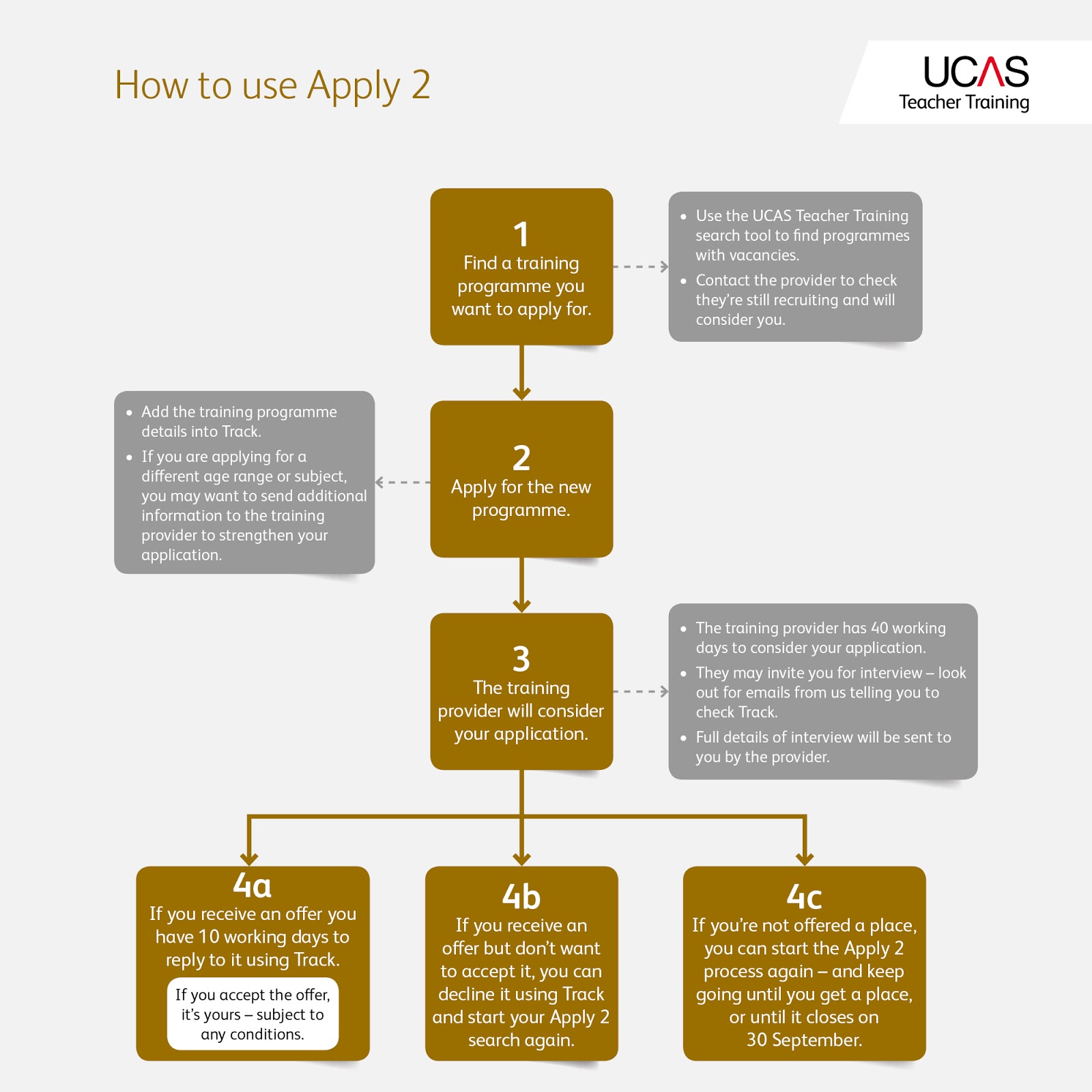
So, to start with what is Apply 2? Well, it’s an opportunity for you to add a new training programme if you’ve been unsuccessful or declined your original choices. It started on 9 November and runs until 30 September 2016. You can add one additional programme from any that have vacancies.

Where can I find vacancies?
You can check what programmes are available in our search tool – the vacancy status indicates whether there are places. It’s also a good idea to contact the training provider to check they're still recruiting and will consider you. Ask if there are any additional documents you can provide – including an updated personal statement – to strengthen your application. To do this, just give them a quick call – you’ll find their contact details also in the search tool.

How do I add an Apply 2 choice? 
If you’re eligible, you’ll have the ‘Add Apply 2 Choice’ option under your original choices in Track. We’ve got more advice on how to add a choice here.

When will the provider make a decision?
The providers have 40 working days to make a decision. If you have a change of heart and want to apply elsewhere, you can add a new programme in place of your current one. But be aware, this will cancel your original choice which means they’ll no longer be able to offer you a place.

As soon as you’ve changed your Apply 2 choice, the 40 day reply period will start again, so make sure it’s something you want to wait for. It’s always worth speaking to the training provider first to find out when they’re likely to make a decision and to make sure you’re not losing any valuable time by choosing a different provider!

When do I reply to an offer?
If you receive an offer, you’ll have 10 working days to accept it. The place will be declined automatically if you don’t reply so make sure you keep an eye on Track!

If you have any further questions about Apply 2 then have a look on our website or get in touch with our advisers on Facebook or Twitter.

Thursday, 8 October 2015

Applying for the 15 October deadline? Make sure you avoid these last minute dramas

There’s not long until the application deadline for dentistry, medicine, veterinary medicine and veterinary science courses, as well as all courses at the University of Oxford and the University of Cambridge. If you’re planning on applying to any of these then you must submit your application by 18:00 (UK time) on 15 October to guarantee being considered by the university or colleges.

To make sure you don’t miss it, we have five top tips on getting your application complete before the deadline.

1) Know your login details for Apply

A simple one to begin with, to complete your application you must be able to log in. If you’ve forgotten your login details, recover them online.

2) Give yourself plenty of time to write your personal statement

Your personal statement is your opportunity to sell yourself to the unis or colleges you’re applying to. It’s important not to rush it and make sure you get all the valuable information in that you need. If you need some inspiration then check out this blog post, it has 10 places to get personal statement pointers.

3) Make sure you give your referees enough time to complete their reference

Your referee must complete a reference before your application can be sent. To check whether they’ve done this, log into your application and check the message on the welcome screen.

i) If you’re applying through your school or college

After you've sent your application to your school or college, you’ll see a message on the ‘Welcome page.’ It’ll either say your application has been sent to UCAS or that we are waiting for your centre to finish your reference or send your application.

Make sure you let your school or college know that you’re applying for courses with a 15 October deadline. As this is earlier than the deadline for most other courses, it’s important to check that they’re able to complete your reference and send your application in time.

ii)  If you’re applying independently

When you log into your application, does the reference box have a red tick against it? If so, then it’s been completed by your referee and you’ll be able to send us your application once you've completed all the other sections. If the reference box has three green dots then it means it’s still incomplete. Speak to your referee to make sure they’re happy to provide a reference for you before the deadline.

4) You need to pay before you can send your application

Before your application can be sent you need to arrange a payment. If you’re applying through your school or college then they may pay the fee for you, check with them if you’re not sure. If your school or college hasn’t arranged this or you’re applying independently, you’ll pay by credit or debit card once every section of your application that’s available to you has been marked with a red tick. This video talks you through the payment section.

5) Don’t leave it until the last minute

You never know what might happen on the day, whether it’s technical issues or internet problems. You don’t want to miss the deadline because of circumstances beyond your control.

Good luck with your application!

If you have any questions about your application, send us a message on Facebook or Twitter and we’ll get back to you as soon as possible.