Showing posts with label references. Show all posts

Thursday, 28 May 2015

Apply 2016 - how to apply...

Apply 2016 is now up and running so you can start filling in your application, ready to send it on its way to the universities in September. Even though your application deadline may seem ages away, it’s worth registering as early as possible to save any last minute dramas down the line. If you’re unsure where you want to go or what you want to study, you don’t need to select your universities or courses just yet. However, you can start by filling in the other sections so you’re ahead of the game. So where do you begin?

Getting started
The basics come first; with questions based around your personal details so they should be straight-forward enough to answer. If you come across any questions that aren't clear, click on the red question mark which explains what you need to include. Check out our handy how-to video for a more in depth view in to the application.

Education
This section’s where you need to add any schools or colleges you’ve attended from around the age of 13 onwards, along with the qualifications you’ve taken. It’s worth having your certificates to hand as they’ll be useful if you’re unsure of any of the details, such as your awarding bodies. There’s quite a lot of info you need to add here so we’ve created this video to help you.

Personal statement
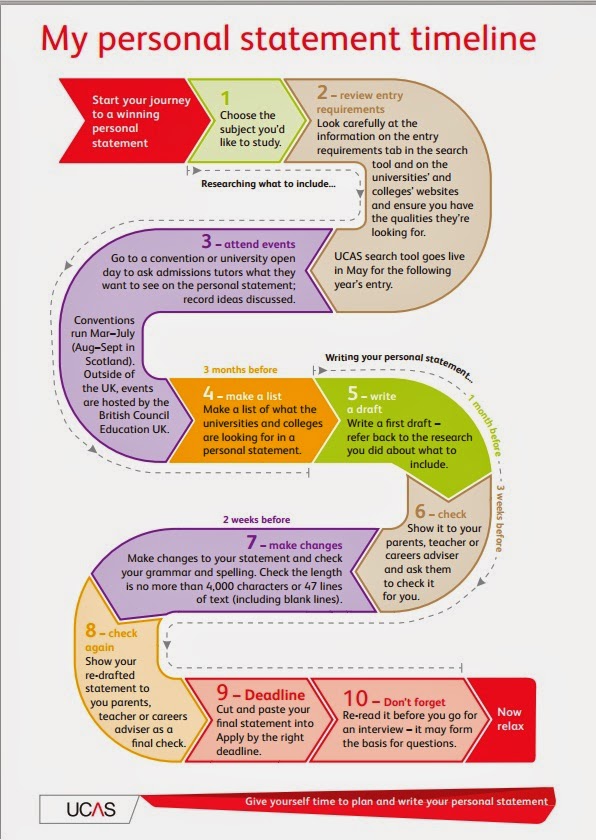
This is your opportunity to shout about your strengths, talk about your interests and expand on why you want to go to university and study your chosen course. On a practical note, it’s best to create a draft of your personal statement in a Word document first then copy it over once you’re happy with it. It’s a good idea to ask a family member, teacher or friend to have a look over it before you add it to your application. A second pair of eyes will pick out any errors you might’ve made or remind you of some important information you’ve missed off. Reading it aloud a couple of times is a good way to check that what you’ve written flows correctly.

Reference
You need a reference before your application can be sent. This should be from a current or previous teacher but can come from someone who knows you in a professional capacity, such as an employer. Your referee can’t be a family member or friend.

There are a couple of ways to get a reference – read on to see which is the right way for you.

i) If you’re applying through your school or college: 

When you register, you’ll be asked to enter a buzzword if you select that you’ll be applying through your school or college. This will link your application to your school or college so your teacher can write your reference. They’ll also be able to look over your application and help you along the way, and when the time comes, they’ll send it to us on your behalf.

ii) If you’re applying independently: 

There are a couple of ways to get a reference if you’re applying independently. If your previous school or college is happy to complete a reference then in the ‘Options’ section you can select ‘ask a registered school, college or centre to write a reference only.’ This route needs a buzzword from the school or college so you’d have to discuss this with them.

Alternatively, you can enter your referee’s contact details in the reference section and we’ll send them an email with instructions on what to do.

If you’re opting for this route, make sure you speak to your referee first and ask if they’ll be able to provide you with a reference before you send them a request. Once they've completed it you’ll be sent an email and the reference section will be marked with a red tick.

Good luck with your application!

If you have any questions about applying then have a look on our website. You can also get in touch with our advisers on Facebook or Twitter and they’ll do their best to help.

Friday, 2 January 2015

15 January FAQs

As the 15 January application deadline approaches, here are some of the top questions we’re answering at the moment:

Q. Why can’t I log into my application?
A. If you can’t log into your application, first of all make sure you’re trying to log into Apply  and not Track by mistake. If you’ve forgotten your username or password, try our ‘Forgotten login?’ link to retrieve or reset your details. If you’re still having trouble then give us a call so one of our advisers can help.

Q. How do I add my qualifications?
A. Before you can add any qualifications you need to add the schools or colleges where you’ve taken them. This video explains everything you need to do.


Q. How should I write my personal statement? 
A. The personal statement may appear daunting at first but try not to panic, we’ve got lots of advice to help! Start by checking out the pointers on our website then take a few moments to watch our personal statement video.


Finally, read this blog post where university staff tell you what they’re looking for, which will give you a better idea on what you should include.

Q. How does the reference section work?
A. There are three ways to request a reference, and the one you’ll use will depend on how you’re applying. Watch our video for a step-by-step guide to what you’ve got to do.


Q. Why can’t I pay and send my application?
A. You can only pay for and send your application when every section of your application is marked with a red tick. If you’re applying through a school or college, they’ll be able to complete a reference and send us your application after you’ve paid for your application. If you’re applying independently then you can pay for and send us your application once your referee has finished your reference. Ross, one of our advisers explains all of this in this video.

Q. What time is the deadline on 15 January?
A. Applications for the majority of courses should arrive at UCAS by 18:00 UK time on 15 January (check your chosen course details in our search tool for the correct deadline). This is to ensure that it gets equal consideration by the unis and colleges you're applying to.

If you’ve got any other questions about your application check out our info on www.ucas.com or get in touch with our advisers on Facebook or Twitter.

Good luck with your application!

Friday, 28 November 2014

How to avoid deadline drama....

The 15 January deadline isn't too far away so we’d like to share some tips with you to make sure you don’t miss it! The deadline for most courses is 18:00 UK time on 15 January, but if you’re not sure you can check the details for your courses in our search tool. Your entire application, including a reference, must be sent to us by this time to be classified as on time.

To apply on time and be in with the best chance of being accepted follow these five steps.

1. Know your login details for Apply

First of all, we’ll start with the basics. Make sure you know your login details. If you can’t log into Apply then try and resolve the issue online. If you’re still having problems you’ll need to give us a call so we can reset your password.


2. Give yourself plenty of time to complete your personal statement

You don’t want to be rushing your personal statement at the last minute and risk missing out vital information. Make sure you give yourself plenty of time before the deadline to draft a version offline, ready to put in your application. If you’re struggling for ideas of what to include then this blog post has lots of advice to help you along the way. We also have some top tips from Jane Marshall, who reads personal statements for a university.

3. Make sure the reference is complete

When someone misses the deadline it’s often to do with confusion about the reference section. Your referee must complete a reference before your application can be sent. You can check the status by logging in and checking the message on the home screen.

i) If you’re applying through your school or college:

After you've sent your application to your school or college, you should see a message on the ‘Welcome page.’ It’ll either say your application has been sent or that we are waiting for your centre to finish your reference or send your application.

If your centre hasn't completed a reference or sent your application then it’s best to check with them that they’ll be able to complete this for you before the deadline.

ii) If you’re applying independently:

Does the reference section have a red tick against it? If so then it’s been completed by your referee and you’ll be able to send us your application once you've completed all the other sections. If the reference box has three green dots then it means it’s still incomplete. Speak to your referee to make sure they’re happy to provide you with a reference before the deadline.


4. You’ll need to pay before you can send your application

When you come to make your payment, wait for the transaction to go through. As soon as it’s been processed the ‘Pay/Send’ section will be marked with a red tick.

It’s worth leaving plenty of time to make a payment in case you encounter any problems. If you’re applying through a centre then your school or college won’t be able to process your application until you've made a payment so try not to leave it until the last day!

If you’re applying independently then the payment will be the last thing you need to do.

5. Be prepared, your school or college may send your application back to you

Sometimes your centre may return your application if they feel you've entered any information incorrectly or missed off important details. You’ll receive an email when this happens but to be sure you can check this when you log in.

Once you've made the necessary changes you need to go through the ‘Pay/Send’ option. If you've made a payment already then you won’t be asked to do this again, you’ll only need to send your application back to your centre.

Once we've received your application you’ll get an email within 48 hours to confirm your application has been processed. Add enquiries@ucas.ac.uk as a contact in your address book to make sure the email doesn't fall into any junk folders.

And finally…… Good luck with your application!

If you have any questions about your application send us a message on Facebook or Twitter. If you've already applied and have some spare time on your hands, download our game Uni Leap for iOS http://ow.ly/DRWWB or Android http://ow.ly/DRWWC while you’re waiting for the universities’ decisions!